How I built a browser extension to make LinkedIn less annoying
Coding and publishing a Chrome plugin with the help of AI tools

Genesis
LinkedIn has its issues–not just the hollow content, fake stories, and unoriginal ideas. You can’t even check when someone’s post was published, because the platform hides the exact date behind relative timestamps like "2d" or "1w ago".
I’ve always wanted to create and publish a browser extension. I started a few but never got to releasing them. I guess they were not useful enough. I also found working on the extensions somehow annoying due to limitations of what you can do with them imposed by browsers.
A few days ago I posted about a tool I’ve created allowing to extract LinkedIn post’s exact date from its URL. Someone encouraged me to turn it into a browser extension. Well, two days and several chats with AI later, here I come with the plugin.
I don’t want it to only be about dates, because there are other LinkedIn quirks that I want to change. I’m also looking for something that would give me better analytics about posted content - mine and others’. Hence, I gave it a more general name.

A look at the extension
You can give it a try here.
It’s simple, the plugin adds a real date to each post it sees on your timeline.
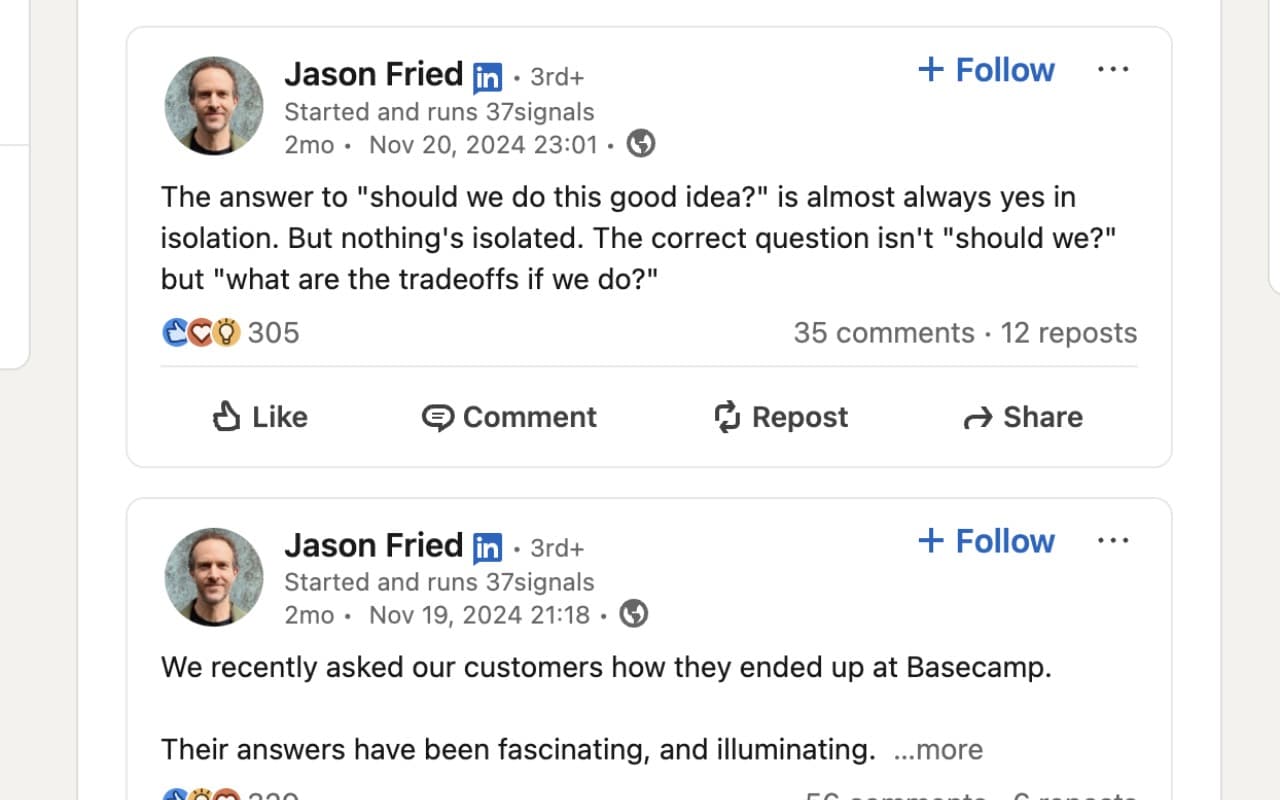
It doesn’t work with short post excerpts in the profile view but once you click to see all posts, timestamps are back.
It also works with comments, displaying the date on hover.

Also added a popup for future functionalities.

Uncomplicated, useful, fun to make.
How to develop a Chrome extension?
This method worked well for getting something done quickly. I’d say I started from nothing since last time I tried to develop an extension was about 5 years ago and focused on Firefox. The whole process took me around four hours.
Start with Google’s hello world tutorial
Also learn how to modify content of web pages
Once you have the above running and open in VS Code or Cursor, use Copilot Edits (I used Claude) or Composer mode to quickly make changes. I used Copilot.
Test and iterate. At some point AI won’t help you anymore and you’ll have to make some tweaks yourself.
Once you are happy with the extension, read how to publish your extension.
Create icons and graphics
I used lucide icons and merged them to create a logo.
You can use an editor like Photopea - an excellent, free, in-browser Photoshop alternative
Create banners and screenshots per instructions, I’ve also used Photopea
Create a privacy policy and host it somewhere. If you have a blog or a website, put it there. Perhaps a google drive link will work as well? I've created this short document - also with the help of ChatGPT and Copilot edits.
Publish and wait patiently for review. (24h in my case)
LLMs were a huge help here, I only made some tweaks to the code. Preparing everything for the publication was quite some work.
Promotion
I decided to promote the extension on my tools website - toolou.com. I just asked Copilot in Edits mode to create a banner and a page based on a functionality description. I’ve asked Copilot Chat to compile it beforehand, based on the extension codebase. I only changed the placeholder URL for extension download page and placed a screenshot in the proper directory.


Future
There’s an elephant in the room – I don’t use Chrome that much. Yeah, I have Edge open all the time (just to have a chromium browser on hand) and it supports Chrome extensions. That said, my daily driver is Safari. I really like how performant and power efficient it is. Since a lot of what I do happens in a browser - it matters. So I’d like to give creating a Safari extension a go. My first impression is that it’s much more complex, because you need to ship it via AppStore, but it makes it even a bit more interesting.
As I mentioned before, I have some other issues with LinkedIn. One of them is that they do not really provide a public API. I cannot programmatically fetch even my own posts or stats. That’s worse than Twitter/X, which API at least lets me fetch a count of followers and posts.
Since I’ll ‘ll be sending data to my server for analysis, I have more ideas in mind. I’d love to do analytics on posts you see on the timeline as well as provide AI-powered suggestions for better content. Maybe also highlight posts worth engaging with?
For now, try the extension, and let me know what you think.
If you liked this content, please support me by sharing this post and subscribing to my Newsletter.
You can also find me here:
About the author
Engineer, Builder, Writer
Comments
Join the discussionFound it very useful when updating content planner. Waiting for some more functions to be included in it!


